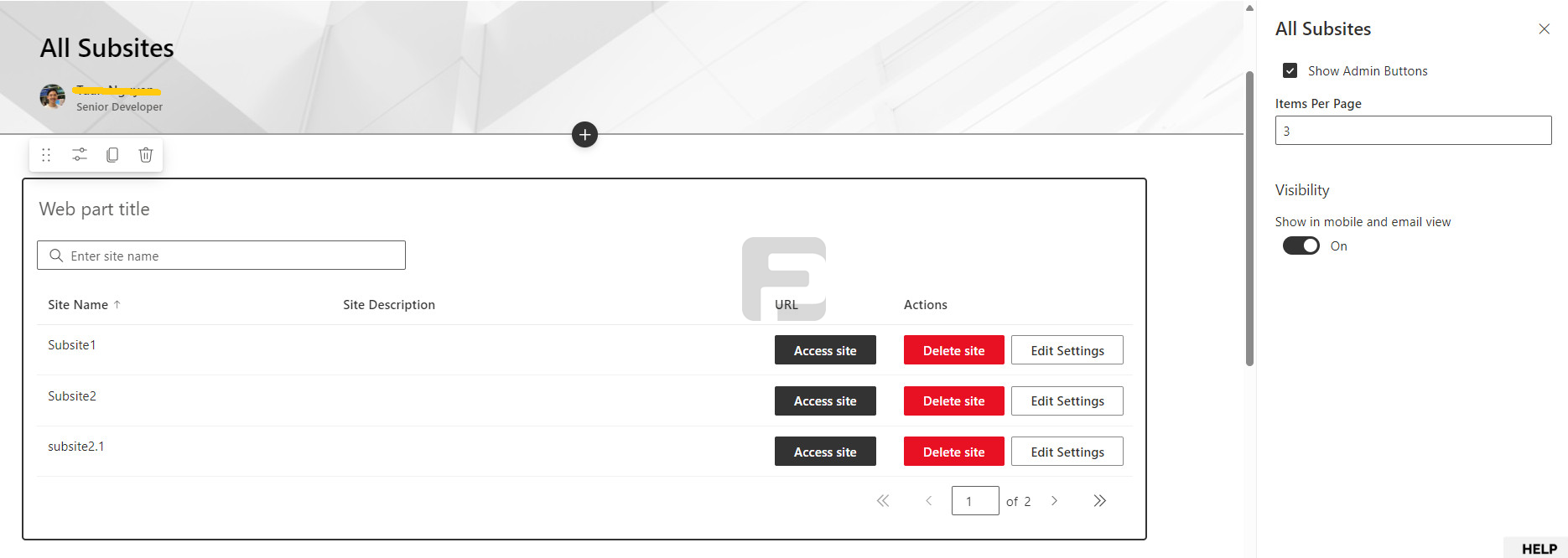
The FusePoint All Subsites web part is a custom SPFx web part that lists every subsite within a SharePoint site collection in a clean, searchable table. It gives users quick access to each subsite and optionally surfaces admin controls — all from a single, configurable interface.
The web part is powered by the SharePoint Search API, so newly created or modified subsites may take a short time to appear as the index updates.
Each row in the table shows:
When Show Admin Buttons is enabled in the property pane, two additional buttons appear per row:
These buttons are hidden by default and only revealed to users with appropriate permissions when the toggle is active.
A search box at the top of the web part lets users filter subsites by name in real time.
Click any column header to sort the list ascending or descending by that field.
Results are paginated. Configure the number of items shown per page from the property pane, and use the navigation arrows to move between pages.
| Setting | Description | |---|---| | Show Admin Buttons | Toggle to show or hide the Delete site and Edit Settings action buttons. | | Items Per Page | Sets how many subsites are displayed per page. | | Show in mobile and email view | Controls visibility of the web part on mobile devices and in email digests. |
Note: Only users with site collection admin rights should enable admin buttons. Deleting a subsite is irreversible.
The FusePoint All Subsites web part is an essential tool for SharePoint site collection administrators and intranet managers. It brings full subsite visibility, search, sorting, pagination, and optional admin controls into a single, easy-to-configure web part — reducing the need to jump between the admin center and individual site settings.
No credit card required.
FusePoint
The perfect addition to your SharePoint environments.
$399
$0
USD for 30 Days
then $399/mo
Get your team started now.